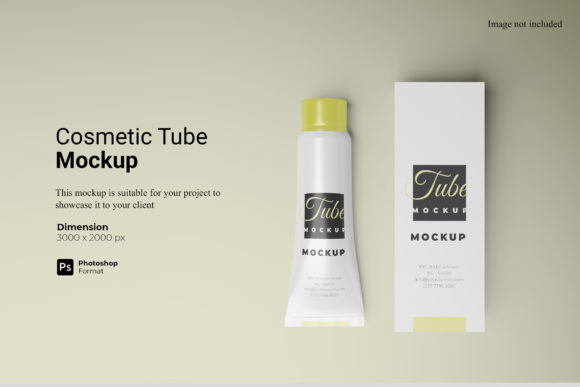
Understanding the Cosmetic Tube Mockup for Professional Brand Presentation
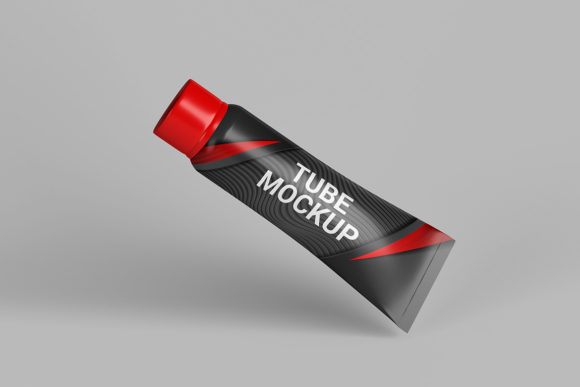
In the highly competitive beauty and personal care industry, visual presentation is often the deciding factor between a product that sells and one that remains on the shelf. Before a single tube of lotion or serum hits the manufacturing line, designers must visualize how their packaging will look in the real world. This is where a Cosmetic Tube Mockup becomes an essential tool in the design workflow. It serves as a digital prototype, allowing professionals to showcase their designs in a realistic 3D display without the high costs associated with physical sampling.
A standard cosmetic tube mockup is typically delivered as a PSD Photoshop file equipped with smart-object features. This technical specification is what distinguishes it from static images or basic templates. The core functionality allows users to replace the current designs with their own artwork within seconds. Instead of manually painting over labels or adjusting shadows layer by layer, the designer simply double-clicks the smart object, pastes their new vector or raster design, saves the file, and watches the 3D model update automatically. This efficiency is critical for agencies and in-house teams managing multiple SKUs or seasonal variations.
Evaluating the Technical Specifications and Workflow Efficiency
When evaluating a Cosmetic Tube Mockup, the resolution and dimensions are primary considerations for print-ready output. High-quality files usually come in at 3000x2000 pixels with a density of 300 dpi. These specifications ensure that the final rendered image retains crisp details when printed for marketing materials, trade show displays, or high-resolution web galleries. For a designer aiming to present a premium brand, pixelation or blurriness can undermine the perceived value of the product immediately.
The inclusion of a PDF help guide further enhances the usability of these resources. While the interface is generally intuitive, specific instructions on how to navigate the layer structure can save valuable time during complex projects. However, it is important to note that the photos used in preview galleries are for illustration purposes only and do not include the actual product photography. The user must supply their own creative assets, which are then seamlessly integrated into the lighting and shadow environment of the mockup.
One of the most distinct advantages of this format is the ability to change the background color. In a professional portfolio or e-commerce listing, consistency is key. A Cosmetic Tube Mockup allows the designer to isolate the product against a neutral white background for clarity, or switch to a branded color scheme that matches the company's identity. This flexibility eliminates the need for manual masking or complex compositing work in post-production.
Comparing Digital Mockups to Traditional Prototyping Methods
To make an informed decision about using a digital template versus other methods, it is necessary to compare it against traditional prototyping approaches. Historically, brands would commission physical samples to test packaging aesthetics. While physical prototypes offer tactile feedback regarding material texture and weight, they are expensive and time-consuming. Creating a physical sample involves mold creation, printing plates, and shipping logistics, often taking weeks or months.
In contrast, a digital Cosmetic Tube Mockup offers immediate gratification. The tradeoff lies in the lack of physical interaction; you cannot feel the squeeze of the tube or the texture of the cap. However, for the initial stages of design review, client approval, and marketing strategy, the digital version is often superior. It allows for rapid iteration. If a client requests a font change or a color shift, a physical prototype requires starting over, whereas a digital mockup takes mere moments to update.
Another comparison point is flat vector illustration versus 3D rendering. Flat illustrations are useful for schematic diagrams but fail to convey depth, volume, and the way light interacts with curved surfaces. A realistic 3D display provided by a high-end mockup captures reflections, creases in the material, and the curvature of the label. This realism builds trust with stakeholders who need to visualize the final product accurately before committing to production costs.
Determining the Best Fit for Your Design Needs
While a Cosmetic Tube Mockup is versatile, it may not be the right choice for every scenario. Understanding the strengths and limitations helps in selecting the appropriate resource. The ideal use case involves branding agencies, freelance designers, and marketing teams preparing launch campaigns. If your goal is to create a compelling social media campaign, a website banner, or a pitch deck for investors, the 3000x2000 px resolution and smart-object capabilities provide exactly what is needed.
However, there are situations where this tool might fall short. If your project relies heavily on the physical properties of the packaging—such as the stiffness of the plastic, the friction of the cap, or the specific embossing effects—a digital mockup cannot replicate these nuances. In such cases, investing in a physical prototype is unavoidable. Additionally, if the design requires extreme customization of the tube shape itself (e.g., a non-standard ergonomic curve), a standard mockup template may not accommodate the geometry without significant distortion.
For those working on large-scale product lines with dozens of variations, the efficiency of the smart-object feature is unmatched. Imagine needing to generate mockups for five different flavors of a single product line. With a standard workflow, this could take hours of manual editing. With a Cosmetic Tube Mockup, you can duplicate the base file, swap the smart objects, and export all five variations in minutes. This scalability makes it a cost-effective solution for growing brands.
Navigating Limitations and Making Strategic Choices
It is crucial to approach digital mockups with a clear understanding of their constraints. The realism is limited by the quality of the original 3D model used to create the PSD file. If the underlying model lacks fine detail, no amount of design adjustment will make the final image look authentic. Therefore, selecting a high-quality source file is a strategic decision that impacts the final output.
Furthermore, while the background color is changeable, the lighting setup is often fixed within the smart object layers. Advanced users can adjust lighting and shadows using Photoshop's native tools, but this requires a higher level of expertise. For beginners, the pre-configured lighting ensures consistency, but it may limit creative experimentation with dramatic lighting scenarios. In these instances, a more advanced 3D rendering software might be necessary, though it comes with a steeper learning curve and longer processing times.
When comparing options, consider the format compatibility. Most Cosmetic Tube Mockups are optimized for Adobe Photoshop. If your team uses alternative design software like Affinity Photo or GIMP, compatibility issues may arise unless the file includes compatible formats or detailed conversion guides. Always verify the software requirements before purchasing or downloading a resource to ensure seamless integration into your existing workflow.
Final Considerations for Professional Evaluation
The decision to utilize a Cosmetic Tube Mockup ultimately rests on balancing speed, cost, and visual fidelity. For the vast majority of cosmetic and personal care brands, the benefits outweigh the limitations. The ability to present a professional, realistic 3D display quickly allows for faster feedback loops and more agile product development cycles.
By leveraging the smart-object features, changing backgrounds effortlessly, and utilizing the high-resolution output, designers can elevate their presentations without incurring the overhead of physical production. Whether you are refining a label design for a new moisturizer or preparing a comprehensive lookbook for a skincare line, this tool provides the foundation for professional communication. As long as the user acknowledges the distinction between digital visualization and physical reality, a Cosmetic Tube Mockup remains an indispensable asset in the modern design arsenal.