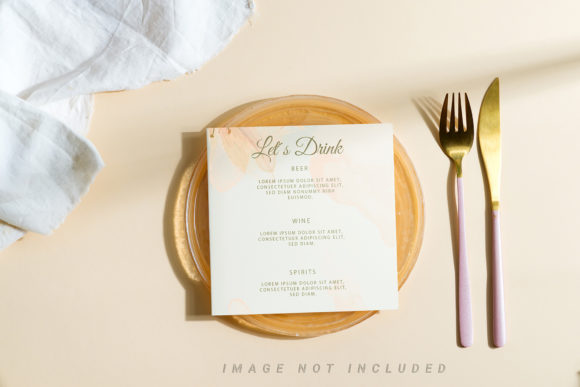
Round Wooden Board with Menu Card Mockup: A Practical Guide for Designers and Entrepreneurs
In the fast-paced world of creative production, the gap between a digital concept and a tangible presentation can often determine the success of a pitch or a product launch. This is where the Round Wooden Board with Menu Card Mockup becomes an essential asset. It is not merely a decorative image; it is a functional tool designed to streamline the workflow for professionals who need to visualize their designs in a realistic context without the overhead of physical photography.
This mockup serves as a bridge between abstract design files and real-world application. Whether you are a restaurant owner finalizing a menu, a graphic designer presenting branding concepts, or a marketer preparing assets for social media, this specific mockup offers a high-fidelity environment to test your work. By integrating this tool into your process, you eliminate guesswork regarding lighting, texture, and composition, allowing you to focus on the core elements of your design.
Understanding the Tool and Its Core Features
The foundation of this resource lies in its technical structure. The Round Wooden Board with Menu Card Mockup is delivered as a high-quality 300 DPI PSD file with dimensions of 6016×4016 pixels. These specifications ensure that the output remains crisp and professional, suitable for both large-format printing and high-resolution digital displays. Unlike vector-based illustrations or 3D renders, this is a photorealistic representation, capturing the natural grain and depth of wood to provide authentic visual weight.
A critical component of this workflow is the Active Smart Object feature. In standard Photoshop workflows, placing a design onto a curved or textured surface often requires complex warping and blending modes that can degrade image quality. With this mockup, the process is simplified. You simply paste your design into the designated smart object layer, save the file, and the system automatically handles the perspective and integration. This automation saves significant time, reducing a task that might take hours of manual adjustment into a matter of seconds.
To further assist in precision, the file includes a defined Safety Zone. These are visible guide lines within the smart object area that indicate the safe boundaries for your content. Any design elements placed outside these lines risk being cropped out by the curvature of the board or the angle of the camera. Activating the layer reveals these zones, ensuring that your typography and graphics remain fully visible and legible in the final composition. It is important to note that while the background and design color do not change, the applied typography is not included, giving you full creative control over the text itself.
Integrating the Mockup into Your Creative Workflow
The true value of this tool emerges when you consider how it fits into various stages of a project lifecycle. For entrepreneurs and small business owners, the mockup acts as a validation tool before committing to expensive print runs. Before sending a menu to a printer, you can drop your layout into the Round Wooden Board with Menu Card Mockup to see exactly how it will look in situ. This step prevents costly errors related to alignment, font size, and contrast against the wooden background.
For freelancers and agencies, this mockup is a powerful communication device during client presentations. Clients often struggle to visualize flat files in a real-world setting. Presenting a design directly on a wooden board provides immediate context, helping stakeholders understand the intended atmosphere and utility of the product. This clarity accelerates the approval process, allowing projects to move from the planning phase to execution more efficiently.
The versatility of the mockup extends to marketing campaigns as well. Content creators and bloggers can use the generated images for social media posts, website banners, or email newsletters. Because the background remains consistent and the lighting is fixed, the resulting images maintain a cohesive aesthetic across different platforms. This consistency is vital for building brand identity, ensuring that your visual language remains recognizable regardless of where the audience encounters it.
Practical Implementation and Best Practices
To get the most out of the Round Wooden Board with Menu Card Mockup, adherence to specific best practices is recommended. Start by organizing your source files properly. Ensure that your design elements are layered logically within your own document before importing them into the mockup. When working with the smart object, always double-check that your content stays within the safety zone. While the smart object handles the perspective distortion, it cannot fix content that has been pushed too far toward the edges.
Typography plays a crucial role in the final outcome since it is not pre-applied. When selecting fonts, consider the rustic and organic nature of the wooden board. Clean, sans-serif fonts often pair well with the natural texture, but hand-drawn scripts can also add character if they align with your brand voice. Remember that the wood grain adds visual complexity, so avoid overly busy patterns in your design that might compete with the background texture.
Efficiency is another key factor. Since the file supports active smart objects, you can create a library of variations quickly. If you are managing multiple menu items or seasonal specials, duplicate the main document, swap the smart object content, and save. This non-destructive editing capability allows you to iterate rapidly without compromising the integrity of the original mockup file. It transforms the mockup from a static template into a dynamic part of your production pipeline.
Quality Control and Long-Term Use
Maintaining high standards is essential for professional output. The 300 DPI resolution ensures that your final exports are sharp enough for print, but you must still manage your export settings carefully. When saving your final images, choose formats that balance quality and file size based on your distribution channel. For web use, JPEGs with optimized compression are typically sufficient, while PDFs are preferred for print-ready submissions.
Furthermore, the durability of the mockup file itself should be considered. Since the safety zones and smart object structures are built into the PSD, avoid deleting or renaming layers unless you are certain of their function. Keeping the file structure intact ensures that future updates or adjustments can be made seamlessly. This longevity makes the investment in the mockup worthwhile for ongoing projects rather than one-off tasks.
Ultimately, the Round Wooden Board with Menu Card Mockup is about empowering creators to produce better work faster. By removing the technical barriers associated with photorealistic compositing, it allows designers, marketers, and business owners to focus on strategy, creativity, and content. Whether you are refining a new menu concept, launching a product line, or simply enhancing your portfolio, this tool provides the reliable foundation needed to execute your vision with confidence.
As you integrate this resource into your routine, remember that the goal is not just to create an image, but to facilitate a smoother path from idea to reality. The combination of high resolution, smart object technology, and thoughtful design guidelines makes this mockup a versatile addition to any professional toolkit. By respecting the safety zones and leveraging the active features, you ensure that your final deliverables are polished, professional, and ready for the market.