Portrait and Landscape Postcard Mockup: A Practical Evaluation for Designers
In the competitive landscape of graphic design, presenting a concept is often just as critical as the creation process itself. Clients and stakeholders need to visualize how a flat file translates into a tangible object before approving a project or launching a campaign. This is where the Portrait and Landscape Postcard Mockup becomes an essential asset in a designer's toolkit. It bridges the gap between digital abstraction and physical reality, offering a realistic 3D display that elevates professional presentations.
This resource is not merely a visual template; it is a functional tool designed to streamline workflows while maintaining high standards of quality. Whether you are a freelancer pitching to a small business owner or a marketing agency preparing a comprehensive brand deck, the ability to showcase designs instantly can make the difference between a closed deal and a new partnership. The following analysis explores the practical value, technical specifications, and real-world applications of this specific mockup set.
The Core Value of Realistic 3D Visualization
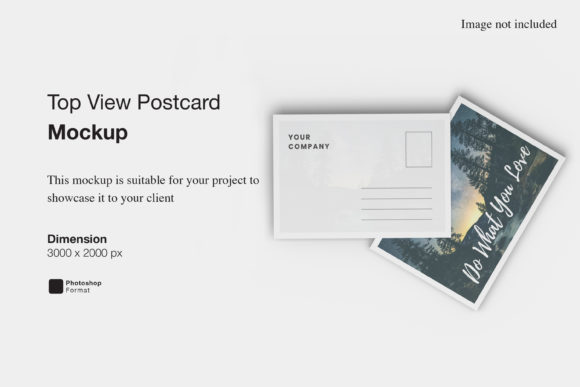
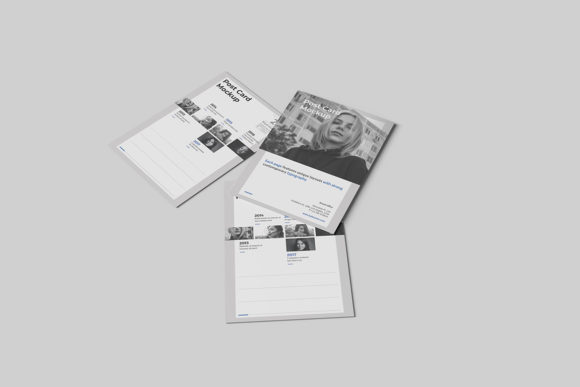
The primary strength of the Portrait and Landscape Postcard Mockup lies in its ability to provide a photorealistic environment. Traditional flat images often fail to convey the texture, weight, and finish of printed materials. By utilizing a 3D display model, designers can demonstrate how their artwork interacts with light, shadow, and surface curvature. This realism builds trust with clients who may struggle to imagine the final product from a two-dimensional screen.
For professionals who rely on visual communication, this level of detail is indispensable. When presenting a postcard design for a local event or a promotional flyer for a retail store, seeing the item placed on a table or held in a hand provides context that flat files cannot. It allows the audience to assess the composition, color balance, and typography within a natural setting. The mockup serves as a proof-of-concept that validates the design decisions before any money is spent on printing.
Technical Specifications and Workflow Efficiency
One of the most significant advantages of this asset is its compatibility with Adobe Photoshop and the implementation of Smart-Object features. For designers managing tight deadlines, the efficiency offered by smart objects is a game-changer. The workflow is straightforward: open the PSD file, double-click the designated layer, paste your design, save, and close. The mockup updates automatically, applying perspective, lighting effects, and shadows to match the scene perfectly.
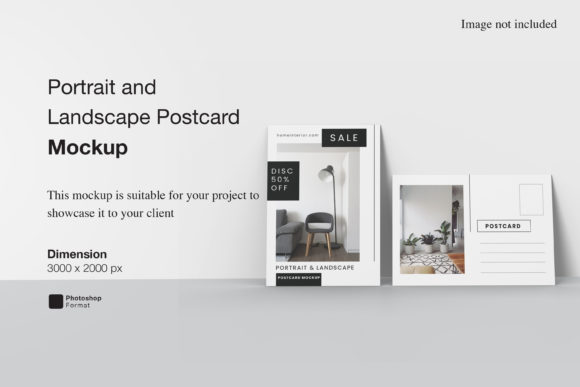
The file resolution is another critical factor for professional use. With dimensions of 3000x2000 pixels at 300 dpi, the Portrait and Landscape Postcard Mockup ensures that output remains crisp even when viewed on high-resolution displays or printed for client meetings. This density eliminates pixelation issues, ensuring that fine details in the artwork are preserved. It meets the industry standard for print-ready quality, making it suitable for both digital portfolios and physical presentation boards.
Additionally, the inclusion of a PDF help guide adds a layer of reliability for users who might be less familiar with advanced Photoshop techniques. While the interface is intuitive, having step-by-step documentation reduces the learning curve and prevents potential errors during the setup phase. This support structure ensures that the tool remains accessible to a broader range of users, from seasoned veterans to those still developing their skills.
Flexibility Through Customizable Environments
A common limitation in many mockup sets is the rigidity of the background. Often, designers are forced to work with a single, unchangeable setting that does not align with their brand identity or the specific context of the project. The Portrait and Landscape Postcard Mockup addresses this by offering changeable background colors. This feature allows for seamless integration with various branding guidelines.
Imagine a scenario where a client wants to see their postcard design against a neutral gray backdrop for a corporate presentation, but later requires a vibrant, colorful background for a social media campaign. Instead of sourcing a new mockup or spending hours editing photos, the user can simply adjust the background color within seconds. This flexibility extends the utility of the asset across multiple projects and platforms.
The ability to switch between portrait and landscape orientations further enhances versatility. Different industries have different requirements; financial institutions often prefer the vertical format for formal invitations, while travel agencies might opt for the horizontal layout to capture scenic vistas. Having both orientations in a single package means designers do not need to purchase separate assets for every project type, saving both time and budget.
Real-World Application and Audience Fit
Who benefits most from this tool? The answer spans a wide spectrum of creative professionals. Freelance graphic designers will find it invaluable for client pitches, allowing them to deliver polished presentations without the cost of physical prototyping. Entrepreneurs and small business owners can use it to visualize their own marketing materials, helping them make informed decisions about design choices before committing to print runs.
Marketers and content creators also gain significant value. In the era of digital-first strategies, social media managers frequently need to create "mock" posts that look like physical mailers to generate engagement. This mockup facilitates the creation of high-quality imagery for blogs, email newsletters, and ad campaigns. Educators and publishers can utilize it to demonstrate book covers or educational flyers to students and administrators.
Serious hobbyists and bloggers who focus on DIY projects or craft businesses will appreciate the ease of use. The combination of high resolution and simple smart-object functionality means that non-experts can achieve professional results without needing extensive training. However, it is important to note that the photos used in the preview are for illustration purposes only. Users must supply their own content to ensure the final output is unique and compliant with copyright laws.
Potential Limitations and Considerations
While the Portrait and Landscape Postcard Mockup offers robust features, it is not without limitations. The reliance on Photoshop means that users must have access to this specific software. Those working exclusively in free alternatives or web-based design tools may find the workflow inaccessible unless they convert their files to compatible formats first. Additionally, the static nature of the mockup limits its use in video presentations unless the user creates frame-by-frame animations manually.
Another consideration is the lighting consistency. While the 3D rendering is realistic, the lighting is fixed based on the original render settings. If a designer needs to match a very specific, unusual lighting condition (such as harsh sunlight or neon signs), they may need to perform additional photo manipulation to blend the design perfectly. Despite these minor constraints, the trade-off for speed and ease of use generally outweighs the need for complex manual adjustments.
Long-Term Value and Strategic Use
Investing in a high-quality mockup set is a strategic decision that pays dividends over time. The Portrait and Landscape Postcard Mockup is not a one-time use asset; it is a reusable component of a professional workflow. Its durability and consistent performance ensure that designers can return to it for future projects without degradation in quality.
By integrating this tool into their daily operations, professionals can reduce the time spent on presentation preparation, allowing more energy to be focused on actual design work. The clarity provided by the 3D display helps in securing approvals faster, which accelerates project timelines and improves cash flow. Ultimately, the value lies in the confidence it instills in the design process, transforming abstract ideas into concrete, believable realities.
For anyone looking to elevate their portfolio or streamline their client interactions, this mockup represents a practical and effective solution. It balances technical precision with user-friendly features, making it a reliable choice for a diverse array of creative needs.