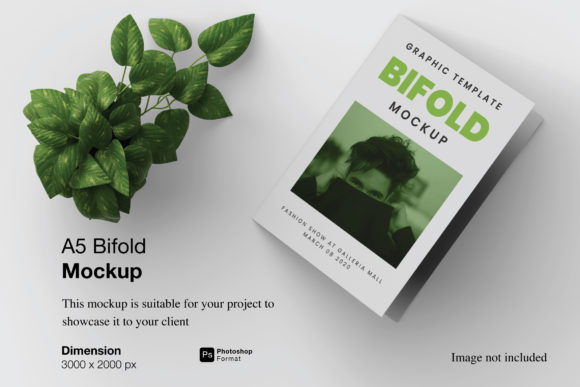
Mastering Professional Presentations with the A5 Bifold Mockup
In the competitive landscape of modern design, the final presentation is often just as critical as the creative work itself. Whether you are a graphic designer pitching a brand identity to a client, an educator preparing visual aids for a workshop, or a small business owner showcasing a new product brochure, the medium through which your work is viewed can significantly influence perception. This is where the A5 Bifold Mockup becomes an indispensable asset. It bridges the gap between digital files and tangible reality, offering a realistic 3D display that allows stakeholders to visualize the end product before it ever leaves the printer.
The transition from a flat screen to a physical object is fraught with challenges. Colors shift, textures are lost, and perspective is flattened. However, by utilizing high-fidelity mockups, professionals can simulate these real-world conditions accurately. The specific advantages of this tool lie in its ability to provide a professional context without the need for expensive photography setups or waiting for print proofs. It serves as a dynamic canvas where creativity meets practical application.
Understanding the Core Capabilities of the Design Tool
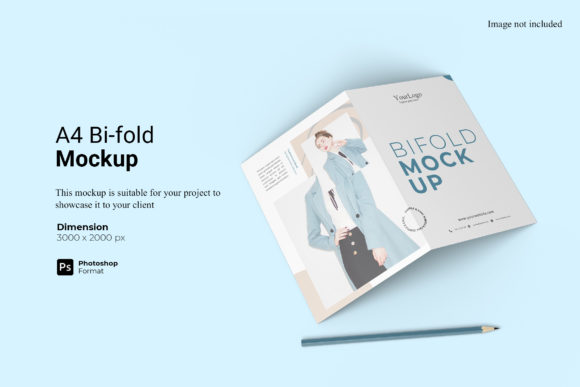
At its heart, this resource is a sophisticated digital template designed to streamline the workflow of visual creators. The A5 Bifold Mockup is not merely a static image; it is a functional interface built within the Adobe Photoshop environment. The file is delivered in PSD format, ensuring compatibility with industry-standard software while leveraging advanced features like Smart-Objects. These smart-object layers are the engine that drives efficiency, allowing users to replace the current designs with their own artwork instantly.
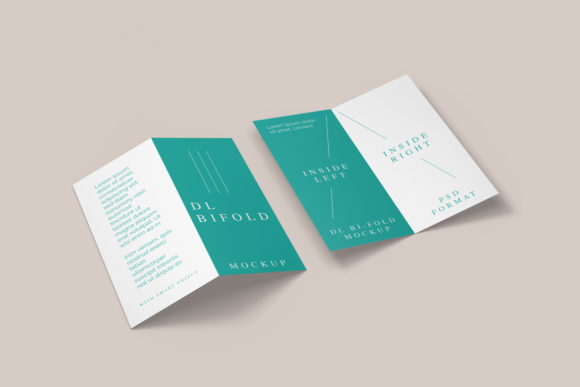
The process of customization is remarkably straightforward. Instead of manually adjusting lighting, shadows, and perspective to fit a logo or layout into a background, the user simply double-clicks the designated layer. This action opens a separate window where the original design can be pasted. Upon saving and closing that window, the mockup automatically updates, wrapping the new design around the folds and curves of the bifold brochure. This automation saves hours of manual editing time, enabling designers to focus on the aesthetic rather than the technicalities of compositing.
- Instant Visualization: See how your layout looks when folded and printed immediately.
- Smart-Object Technology: Replace content without altering the lighting or shadow effects.
- High Resolution Output: Created at 300 dpi with a size of 3000x2000 px, ensuring crisp details for web and print previews.
Practical Applications Across Diverse Industries
The versatility of the A5 Bifold Mockup extends far beyond the realm of graphic design studios. Its utility spans various sectors, each requiring different approaches to visual communication. Understanding these use cases helps illustrate why this tool has become a staple for professionals seeking to elevate their portfolio and client interactions.
For Graphic Designers and Agencies
Design agencies constantly face the challenge of selling abstract concepts to clients who may struggle to imagine a flat vector becoming a physical brochure. By presenting a project using this mockup, designers can demonstrate the tactile quality of the final piece. The realistic 3D display provides a level of immersion that standard screenshots cannot match. Clients can appreciate the weight of the paper, the sharpness of the fold, and the overall elegance of the layout. This clarity reduces revision cycles and accelerates approval processes.
For Educators and Researchers
In academic settings, visual aids play a crucial role in conveying complex information. Researchers presenting papers or educators teaching design principles can utilize the mockup to create engaging handouts or presentation slides. The ability to easily swap out text and images means that lecture materials can be updated rapidly for different classes or conferences. Furthermore, the high resolution ensures that even when projected onto large screens, the text remains legible and the graphics retain their integrity.
For Business Owners and Entrepreneurs
Small business owners often wear multiple hats, including marketing and sales. When launching a new service or product, a professionally presented brochure can make the difference between a casual inquiry and a committed sale. Using the A5 Bifold Mockup, entrepreneurs can generate marketing collateral for social media, email campaigns, or investor pitches. They can showcase their branding in a context that implies stability and professionalism, effectively competing with larger corporations that have dedicated marketing departments.
For Hobbyists and Content Creators
Creativity knows no bounds, and hobbyists often produce work that rivals professional output. Whether designing fan art, personal stationery, or DIY project guides, having access to tools that mimic professional production values is empowering. This mockup allows individuals to treat their personal projects with the same seriousness as commercial work, fostering a sense of pride and encouraging higher standards in their craft.
Technical Specifications and Workflow Efficiency
The effectiveness of any design tool relies heavily on its technical specifications and ease of use. The A5 Bifold Mockup is engineered to meet rigorous standards while remaining accessible to users of all skill levels. One of the standout features is the changeable background-color capability. While many mockups come with a fixed setting, this flexibility allows creators to tailor the presentation to specific brand guidelines or thematic requirements. Whether a soft pastel backdrop is needed for a wedding invitation or a stark white surface for a corporate report, the background can be adjusted to suit the mood.
The resolution of 300 dpi is particularly noteworthy. In the world of print and digital display, pixel density determines clarity. A lower resolution might look acceptable on a mobile phone but would appear blurry when zoomed in on a desktop monitor or printed as a thumbnail. At 3000x2000 pixels, this mockup offers ample detail for high-definition displays, ensuring that every curve of the paper and every shadow cast by the fold is rendered with precision.
To further enhance the user experience, a PDF help guide is included with the download. This documentation serves as a quick reference for troubleshooting common issues or learning advanced techniques for manipulating the smart objects. For those new to Photoshop, the guide demystifies the process, turning what could be a daunting technical hurdle into a seamless operation. It emphasizes that the photos used in the preview are for illustration purposes only, clarifying that the actual product includes the editable template necessary for creating unique visuals.
Strategic Advantages Over Traditional Methods
Comparing the use of a digital mockup to traditional methods reveals significant advantages in terms of cost, time, and environmental impact. Traditionally, to show a client how a brochure would look, a designer might order a physical proof. This involves printing costs, shipping delays, and the risk of errors that require re-printing. Additionally, shipping heavy physical samples globally can be prohibitively expensive and slow.
By contrast, the A5 Bifold Mockup eliminates these friction points. The entire process happens digitally, allowing for instant sharing via email, cloud storage, or direct links. A designer in New York can send a polished presentation to a client in Tokyo within seconds. The environmental footprint is also reduced, as there is no need for paper waste during the review phase. This aligns with the growing trend of sustainable business practices, demonstrating a commitment to efficiency and responsibility.
Furthermore, the iterative nature of design benefits immensely from this approach. Designers can quickly test multiple variations of a layout. If a client prefers a different font or color scheme, the change can be made and the mockup regenerated in moments. This agility fosters a collaborative environment where feedback is acted upon immediately, leading to a more satisfactory outcome for both parties.
Considerations for Optimal Usage
While the tool is powerful, maximizing its potential requires a thoughtful approach. Users should ensure that their source designs are prepared correctly before importing them into the smart-object layers. High-resolution assets are essential to maintain the quality of the final output. Blurry logos or pixelated images will remain visible even after being wrapped around the mockup, potentially undermining the professional appearance.
Additionally, understanding the lighting and texture of the mockup is important. The realistic 3D display relies on pre-set lighting conditions to create depth. When replacing designs, users should consider how their color palette interacts with these shadows. Bright colors may appear slightly darker in the folded sections due to the simulated lighting, so adjustments might be necessary to ensure visual consistency across the entire spread.
It is also worth noting that while the mockup is highly versatile, it is a representation, not the final product. Physical printing can introduce slight variations due to ink absorption and paper grain. Therefore, the mockup should be viewed as a guide for expectations rather than a guarantee of the exact print result. However, for the vast majority of digital presentations and preliminary approvals, it provides an accuracy that is sufficient for decision-making.
Integrating the Mockup into Your Creative Routine
Adopting the A5 Bifold Mockup into your daily workflow is a strategic move that pays dividends in productivity and presentation quality. It encourages a mindset of finishing strong, reminding creators that the presentation of their work is a vital component of the design process. By integrating this tool early in the project lifecycle, teams can identify potential issues with layout and spacing before moving to the production phase.
For businesses looking to scale their operations, having a library of such templates can standardize the output of marketing materials. Ensuring that all team members use the same high-quality mockups maintains brand consistency across all communications. It creates a unified visual language that reinforces trust and reliability among customers and partners.
In conclusion, the A5 Bifold Mockup represents a convergence of technology and creativity. It empowers professionals, consumers, creators, educators, researchers, hobbyists, and business owners to present their ideas with clarity and confidence. By offering easy-to-use smart-object features, high-resolution capabilities, and flexible background options, it removes the barriers between imagination and realization. As the demand for high-quality visual communication continues to grow, tools like this will remain essential for anyone looking to showcase their designs professionally in a realistic 3D display.