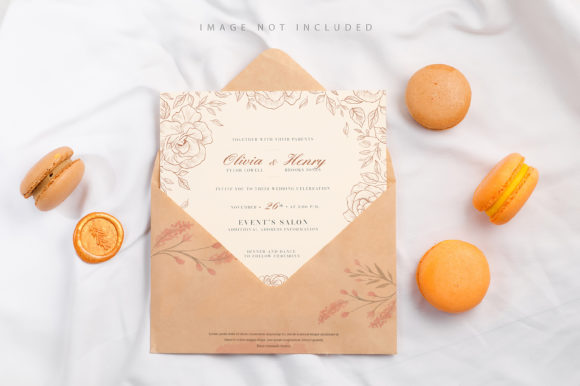
Colorful Macarons and Mockup Letter for Designers
In the fast-paced world of digital design, presenting a concept is often just as critical as creating it. Clients and collaborators need to visualize how a brand identity will look in a real-world context before committing resources. This is where high-quality mockups become indispensable tools. The Colorful Macarons and Mockup Letter offers a unique solution for professionals seeking to showcase their typography and graphic work with a touch of whimsy and elegance. By combining the visual appeal of confectionery aesthetics with functional lettering elements, this resource bridges the gap between creative imagination and professional presentation.
This tool is designed specifically for those who value efficiency without sacrificing quality. Whether you are a freelancer pitching a new logo, an educator preparing materials for a class, or a business owner finalizing packaging designs, having a reliable way to display your work can significantly impact your success rate. The Colorful Macarons and Mockup Letter simplifies the process of creating stunning visuals, allowing users to focus on their creativity rather than wrestling with complex software settings.
Understanding the Core Features
At its heart, this mockup file is built on Adobe Photoshop's robust Smart Object technology. The primary advantage lies in its ease of use. You do not need to be an expert in layer masking or clipping paths to achieve professional results. The workflow is straightforward: simply paste your design into the designated smart object layer, save the file, and watch your artwork transform instantly. This "paste and save" mechanism ensures that your changes are reflected accurately and immediately, streamlining the revision process.
A standout feature of this resource is the inclusion of a dedicated Safety Zone. In any design project, ensuring that critical elements remain visible and unobstructed is paramount. The Safety Zone acts as a guide, outlining the specific area within the smart object where content will be safely rendered. If you place text or graphics outside these lines, they may be cropped or obscured by the surrounding elements like the macaron wrappers or shadows. To help you utilize this effectively, the template includes a specific layer that, when activated, reveals the boundaries of this zone. This prevents common mistakes and guarantees that your final output looks polished and intentional.
The technical specifications are equally impressive, catering to high-resolution requirements. With a size of 6016×4016 pixels and a resolution of 300 DPI, the files are print-ready and suitable for large-format displays. This level of detail ensures that whether you are printing a brochure or displaying a banner on a website, the image remains crisp and clear. It is important to note that this is a photorealistic mockup, not a 3D model or a vector illustration. This distinction matters because it provides realistic lighting, shadows, and textures that give your design a tangible feel. However, users should be aware that the background colors and the base design elements are fixed; the mockup does not automatically change the color of the environment to match your design.
Practical Applications Across Industries
The versatility of the Colorful Macarons and Mockup Letter makes it applicable across a wide spectrum of industries. For marketing professionals and agencies, this tool is perfect for creating portfolio pieces that demonstrate branding capabilities. Imagine presenting a rebranding project for a boutique bakery or a lifestyle blog; placing the client's new logo onto the colorful macaron wrapper adds a layer of realism that flat images simply cannot achieve.
Educators and students also find immense value in this resource. When teaching design principles, showing students how typography interacts with physical surfaces helps bridge the theoretical and practical. A student can experiment with different fonts and layouts, seeing immediately how their choices affect the overall aesthetic of a product label. Similarly, bloggers and publishers can use these mockups to create engaging social media content. Instead of posting a plain screenshot of a design, sharing a visually appealing mockup can drive higher engagement rates and attract more followers.
For entrepreneurs and small business owners, this mockup serves as a low-cost prototyping tool. Before investing in expensive packaging production runs, a business owner can visualize their product on a mockup to gauge market reaction. The playful nature of the macaron theme lends itself well to food and beverage brands, artisanal goods, and gift shops. It allows them to communicate their vision clearly to manufacturers and stakeholders, reducing the risk of miscommunication during the production phase.
Maximizing Efficiency and Professionalism
One of the most significant benefits of using this specific mockup is the time saved during the design workflow. Traditional methods of creating mockups often involve manual adjustments, blending modes, and shadow creation, which can take hours. With the Colorful Macarons and Mockup Letter, the heavy lifting is done for you. The active smart object handles the integration, while the safety zone ensures accuracy. This efficiency translates directly into productivity, allowing designers to take on more projects or dedicate more time to refining their core creative work.
Furthermore, the high-quality output enhances the perceived value of your work. Clients are more likely to trust a designer who presents their ideas in a realistic, professional manner. A clean, well-executed mockup suggests attention to detail and a commitment to excellence. It elevates the conversation from abstract concepts to concrete realities. Even though the typography included in the mockup is not part of the editable design (as per the documentation), this actually encourages designers to apply their own custom typefaces, ensuring the final result is unique to the brand being showcased.
Considerations for Implementation
While the Colorful Macarons and Mockup Letter is a powerful tool, there are practical considerations to keep in mind. Since the background and design colors do not change, it is crucial to select a mockup that aligns with the color palette of your project. If your brand uses cool tones but the mockup features warm, pastel macarons, the contrast might not be ideal. Always review the base image before applying your design to ensure harmony.
Additionally, remember that the Safety Zone is a boundary, not a suggestion. Respecting these limits is essential for maintaining the integrity of the mockup. Ignoring the zone can lead to cropped logos or cut-off text, which undermines the professional appearance you are trying to achieve. Finally, since the file is provided in PSD format, ensure you have the necessary software version to open and edit smart objects effectively. The documentation included with the download is a valuable resource for troubleshooting any issues or understanding the specific layer structure.
Ultimately, the goal of any design resource is to empower the creator. The Colorful Macarons and Mockup Letter achieves this by offering a blend of aesthetic charm and technical utility. It removes the friction from the presentation process, allowing your designs to speak for themselves in a vivid, memorable way. Whether you are launching a new venture or refining your portfolio, this tool provides the foundation needed to make a lasting impression.