Front View Laptop and Smartphone Mockup: A Practical Evaluation for Designers
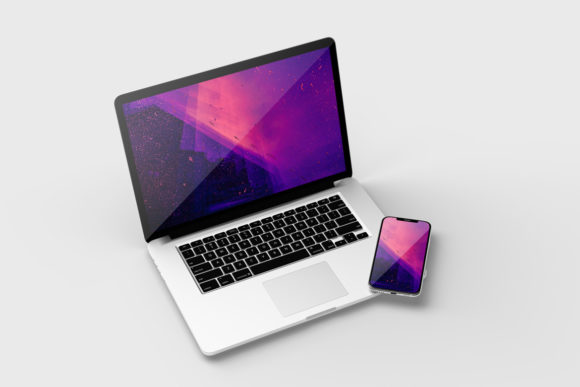
In the competitive landscape of digital design, presenting a concept is often just as critical as the concept itself. A brilliant interface or a sleek branding identity can lose its impact if displayed in a flat, unconvincing format. This is where the Front View Laptop and Smartphone Mockup becomes an essential asset for professionals seeking to elevate their portfolio presentations. It serves as more than just a visual placeholder; it provides a realistic 3D environment that allows designers to showcase their work with immediate credibility.
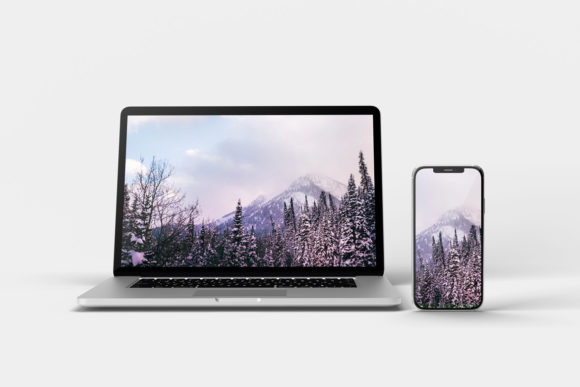
This resource is specifically engineered for users who need to communicate ideas quickly without sacrificing aesthetic quality. By offering a front-facing perspective on both a laptop and a smartphone, the mockup creates a cohesive narrative about how a design functions across different form factors. The core value lies in its efficiency. Using smart-object features within Adobe Photoshop, users can replace the current designs with their own assets in seconds, streamlining the workflow significantly.
Technical Specifications and Workflow Integration
The foundation of this tool's utility rests on its technical specifications, which are tailored to meet professional standards. The file is delivered in PSD (Photoshop Document) format, ensuring broad compatibility with industry-standard software. One of the most significant advantages is the inclusion of smart objects. For those unfamiliar with the term, smart objects allow for non-destructive editing. This means you can scale, rotate, or transform your design layer without losing pixel data or introducing artifacts, a common pitfall when working with standard raster images.
The resolution of the mockup is set at 3000x2000 pixels with a density of 300 dpi. This high-resolution output is crucial for various use cases. Whether you are preparing a print-ready brochure, creating a high-fidelity web banner, or exporting a sharp image for social media, the 300 dpi setting ensures crisp lines and clear text. Many lower-quality mockups struggle at this resolution, resulting in blurry screens that undermine the professionalism of the presentation. With this specification, the Front View Laptop and Smartphone Mockup delivers clarity regardless of the output medium.
- Format: Native PSD compatible with Adobe Photoshop CS6 and later versions.
- Resolution: 3000x2000 pixels, optimized for high-definition displays and print.
- DPI: 300 dots per inch for sharp, detailed rendering.
- Editing Method: Smart Object layers enable instant content replacement.
Design Flexibility and Customization Options
While realism is a primary goal, rigidity is not. A major strength of this mockup set is its flexibility regarding background elements. The design includes options for changing the background color, allowing the user to match the mockup to specific brand guidelines or project themes. This feature is particularly valuable for marketers and small business owners who need consistent visual assets across different campaigns. Instead of hunting for multiple mockup variations, one template can be adapted to fit a red-themed product launch or a minimalist black-and-white corporate report.
The ease of use extends beyond simple color swaps. The interface is designed so that even those with limited Photoshop experience can navigate the file structure. The included PDF help guide acts as a practical reference, walking users through the process of inserting their artwork. This reduces the learning curve and minimizes frustration. In a professional setting, time is a currency. Being able to swap a design and export a finished image within minutes allows creators to focus more on the actual creative work rather than troubleshooting technical hurdles.
Real-World Application and Professional Utility
To understand the true worth of the Front View Laptop and Smartphone Mockup, one must look at how it performs in real-world scenarios. Consider a freelance web developer pitching a new e-commerce site to a client. Presenting wireframes on a plain white screen looks amateurish. However, placing those same wireframes into this mockup, showing them running on a modern laptop and a mobile device side-by-side, instantly contextualizes the user experience. It helps the client visualize the final product, bridging the gap between abstract code and tangible reality.
Similarly, for app developers, the smartphone component is indispensable. Mobile-first design is no longer optional; it is the standard. This mockup allows developers to demonstrate how their application adapts to the vertical screen of a phone while simultaneously showing the desktop counterpart on the laptop. This dual-perspective view reinforces the idea of responsive design, a key selling point for any tech service provider.
The consistency provided by the front-view angle is also a subtle but powerful element. Unlike mockups that show devices from odd angles or with heavy reflections, the straight-on approach keeps the focus squarely on the content. This neutrality prevents the frame from distracting the viewer, ensuring that the colors, typography, and layout of the design remain the stars of the show.
Ideal Users and Strategic Fit
This tool is not a one-size-fits-all solution, but it aligns perfectly with the needs of specific groups. Freelancers and agency owners will find it particularly useful for client proposals and case studies. The ability to quickly generate multiple variations of a single project helps in building comprehensive portfolios that demonstrate versatility. Entrepreneurs launching a new product can use these images for crowdfunding campaigns, such as Kickstarter or Indiegogo, where visual appeal directly correlates with funding success.
Bloggers and content publishers also benefit from this resource. High-quality featured images improve click-through rates and keep readers engaged. Educators teaching UI/UX principles can use the mockup to illustrate concepts in slides or handouts, providing students with a realistic example of how designs translate to physical devices. Even serious hobbyists looking to share their projects on platforms like Dribbble or Behance will appreciate the professional polish this mockup adds to their submissions.
However, there are limitations to consider. The mockup relies entirely on the user having access to Adobe Photoshop. While widely used, it is not accessible to those using alternative design tools like Figma or Sketch without a conversion step. Additionally, the preview images provided with the download are for illustration purposes only; they do not include the actual photos used in the demo. Users should be prepared to source their own lifestyle imagery if they wish to create a composite scene, though the mockup itself is designed to stand alone effectively.
Evaluating Long-Term Value and Reliability
When assessing the long-term value of the Front View Laptop and Smartphone Mockup, reliability is a key factor. A good mockup should withstand repeated edits without degrading. Thanks to the smart object architecture, this file maintains its integrity over time. You can update your designs repeatedly throughout a project lifecycle, knowing that the underlying structure remains stable. This reliability builds trust, encouraging users to incorporate the asset into their standard toolkit.
The 3000x2000 px size offers future-proofing as well. As display technologies evolve and screen resolutions increase, having a high-resolution base ensures that your assets remain usable. There is no need to hunt for new mockups every time a client requests a larger file size. This aspect contributes to a sustainable workflow, reducing the administrative burden of asset management.
In conclusion, the Front View Laptop and Smartphone Mockup represents a solid investment of time and resources for anyone involved in digital design communication. Its combination of high resolution, easy-to-use smart objects, and flexible customization options addresses the core needs of modern creatives. While it requires a specific software environment, the efficiency gains and the professional quality of the output make it a worthwhile addition to any designer's arsenal. For those looking to present their work with clarity, precision, and a touch of realism, this mockup provides the necessary framework to turn a digital concept into a compelling visual story.