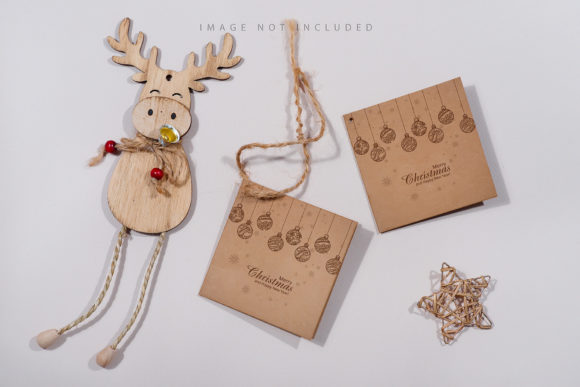
Two Labels Mockup with Christmas Deer
The holiday season brings a unique set of challenges for designers and brand strategists. You need to capture the festive spirit without sacrificing professionalism, and you must ensure your visual assets stand out in a crowded marketplace. This is where the Two Labels Mockup with Christmas Deer becomes an essential tool in your creative workflow. It is not merely a template; it is a strategic asset designed to elevate packaging design, editorial layouts, and social media graphics with a touch of seasonal warmth.
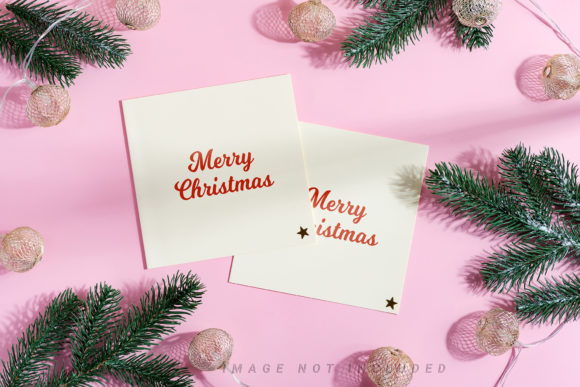
This mockup features a realistic, high-resolution presentation that allows you to visualize your designs in a context that resonates immediately with consumers. The scene is grounded in reality, utilizing a photographic base rather than a 3D render or vector illustration. This distinction is crucial because it provides authentic lighting, shadows, and texture that help potential clients or customers see exactly how their product will look on a shelf or in a home setting. The centerpiece of this composition is the charming Christmas deer motif, which adds a whimsical yet elegant personality to the overall aesthetic.
Visual Characteristics and Design Appeal
When evaluating design assets, the first thing you notice is the atmosphere. The Two Labels Mockup with Christmas Deer strikes a balance between traditional holiday imagery and modern cleanliness. The deer element serves as a natural frame, drawing the eye toward the center where your label or typography would sit. This creates a strong focal point that guides the viewer's attention naturally.
The style is versatile enough to suit various brand identities. Whether you are working with a rustic, handcrafted font or a sleek, contemporary typeface, the background remains neutral enough to let your work shine. However, it is important to note that the background color and the deer elements are fixed. The mockup is a photo, meaning the environment does not change based on your input. This constraint actually works in your favor by enforcing consistency. It forces you to focus on the core elements: your logo, your message, and your color palette.
The dimensions of this file are substantial, offering a resolution of 6016×4016 pixels. This size is ideal for large-format printing, high-definition web banners, and detailed social media posts. At 300 DPI, the quality ensures that every pixel is sharp, making it suitable for professional print production where clarity is non-negotiable.
Smart Object Workflow and Technical Precision
For busy creatives, time is a currency. This mockup is built with efficiency in mind through the use of active smart objects. The process is straightforward: simply paste your design into the designated smart object layer, save the file, and watch your artwork transform instantly. There is no need for complex masking or manual resizing.
A standout feature of this tool is the inclusion of a Safety Zone. In the world of packaging and print design, margins are critical. If text or logos are placed too close to the edge, they risk being cut off during production or looking cramped in the final display. The Safety Zone acts as a visual guide, outlining the area where your content should safely reside. These lines are part of a separate layer that you can activate or deactivate at will. By enabling this layer, you ensure that your typography and key graphics remain fully visible and legible within the composition.
This level of detail demonstrates a commitment to practical utility. It acknowledges that designers often struggle with alignment and proportion when presenting concepts. By providing these technical guardrails, the mockup reduces the cognitive load, allowing you to focus on creativity rather than mechanics. The documentation included with the .psd file further supports this ease of use, ensuring that even those less familiar with advanced Photoshop techniques can produce professional results quickly.
Strategic Applications Across Creative Industries
The versatility of the Two Labels Mockup with Christmas Deer extends far beyond simple label creation. Its primary strength lies in its ability to adapt to different typographic styles and project requirements. For brands launching limited-edition holiday products, this mockup offers a perfect canvas. It pairs exceptionally well with serif fonts that evoke tradition and trust, or script fonts that suggest luxury and personal care.
In the realm of brand identity, consistency is key. Using a high-quality mockup like this helps maintain a cohesive look across all marketing channels. When you present a proposal to a client, showing their logo on a beautifully rendered label with a festive theme makes the concept tangible. It moves the conversation from abstract ideas to concrete possibilities. This is particularly effective for entrepreneurs and small business owners who need to pitch their products to retailers or investors.
Editorial design and publishing also benefit significantly from such assets. Bloggers and content creators can use the image to illustrate articles about holiday trends, gift guides, or DIY crafts. The realistic nature of the photo adds credibility to the content, distinguishing it from generic clip art. Furthermore, for web design teams, the high resolution allows for responsive images that look crisp on retina displays, enhancing user experience and engagement.
Evaluating Fit and Typography Pairing
Selecting the right typeface is a critical decision that influences readability, visual hierarchy, and brand perception. When using this mockup, consider how your chosen font interacts with the deer imagery. A heavy, bold display font might compete with the intricate details of the deer, whereas a lighter, airy sans-serif might blend too seamlessly into the background.
To achieve a balanced composition, try testing different font pairings. If your brand uses a handwritten or script font for the main title, pair it with a clean sans-serif for the secondary information. This contrast creates a dynamic visual rhythm that keeps the audience engaged. Remember that the mockup itself does not include any pre-set typography; you have the freedom to apply any commercial font that aligns with your brand guidelines.
Before finalizing your design, review the safety zone carefully. Ensure that your most important elements—the brand name and the call to action—are well within the boundaries. This attention to detail signals professionalism and respect for the viewer's experience. It shows that you understand the nuances of layout and composition, traits that are highly valued in the industry.
Maximizing Commercial Potential
Ultimately, the goal of any design asset is to facilitate communication and drive action. The Two Labels Mockup with Christmas Deer is designed to help you communicate your message effectively during one of the busiest times of the year. By providing a realistic preview of your product, you reduce the friction between concept and realization.
Whether you are a marketer planning a holiday campaign, a publisher creating a festive magazine spread, or a crafter showcasing handmade goods, this mockup offers a reliable solution. It combines technical precision with artistic charm, making it a valuable addition to your library of design assets. With its high-quality output and user-friendly smart object system, it empowers you to create stunning visuals that resonate with your audience and elevate your brand presence.
As you integrate this tool into your workflow, remember that the true power lies in your creative vision. The mockup provides the stage, but your design choices determine the performance. Use the safety zones to protect your content, leverage the high resolution for maximum impact, and let the festive deer motif add that extra touch of holiday magic to your projects.