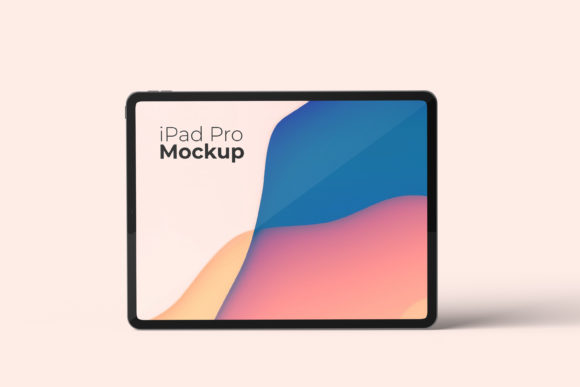
IPad Pro Mockup V3: Elevate Your Design Portfolio
In the digital landscape, your design is only as good as how it is presented. A stunning interface concept can lose its impact if displayed on a generic flat screen or a poorly rendered device frame. This is where IPad Pro Mockup V3 becomes an essential asset for any creative professional looking to bridge the gap between raw concept and polished reality. It transforms simple raster files into convincing 3D displays that command attention and convey professionalism instantly.
This tool is not merely a template; it is a strategic presentation layer designed for creators who understand that context matters. Whether you are a freelancer pitching to a new client, a marketer preparing a social media campaign, or an entrepreneur showcasing a new app idea, the visual fidelity of your mockups directly influences perception. The IPad Pro Mockup V3 offers a realistic 3D environment that allows your work to breathe, providing the depth and lighting necessary to make your designs feel tangible and ready for market.
The Power of Smart-Object Workflow
One of the most significant advantages of this PSD Photoshop format is the seamless integration of smart-object features. In the fast-paced world of design, time is often the most valuable currency. You do not want to spend hours manually adjusting perspective, blending modes, or masking images. With IPad Pro Mockup V3, replacing your current designs with your own artwork takes seconds.
The workflow is intuitive and efficient:
- Open the file: Load the high-resolution PSD in Adobe Photoshop.
- Locate the Smart Object: Find the designated layer group labeled for image replacement.
- Double-click: Open the embedded smart object file.
- Paste your art: Drop your design onto the canvas, save, and close the window.
- Instant Result: Your design automatically conforms to the 3D perspective, lighting, and shadows of the iPad Pro frame.
This automation ensures consistency across multiple projects. You can generate a series of variations for different clients without worrying about technical errors in alignment or rendering. It allows you to focus entirely on the creative strategy rather than the mechanical execution.
Creative Possibilities and Use Cases
The versatility of IPad Pro Mockup V3 extends far beyond simple app screenshots. Its realistic 3D display makes it suitable for a wide array of applications, allowing users to interpret their designs in various contexts. For mobile app developers, this mockup serves as a perfect showcase for user interface (UI) and user experience (UX) flows. You can present a dark mode versus light mode comparison side-by-side, highlighting the adaptability of your design system.
For graphic designers and illustrators, the device acts as a modern digital canvas. Imagine displaying a vibrant poster design or a brand identity package on the sleek screen of the iPad Pro. The high-fidelity rendering captures the nuances of color accuracy, which is critical when presenting print-to-digital transitions. Bloggers and content creators can use these visuals to illustrate articles about technology trends, productivity tools, or creative software reviews, adding a layer of authenticity to their written content.
Entrepreneurs and small business owners often need to pitch ideas before the final product exists. A high-quality mockup provides a "proof of concept" that investors can visualize. Instead of describing a feature set verbally, you show a functional-looking prototype running on a premium device. This tangible representation builds confidence and credibility, making abstract ideas feel concrete and achievable.
Adapting to Different Audiences and Platforms
Different audiences require different visual approaches. Educators might use the mockup to demonstrate educational software or interactive learning modules. By changing the background color, they can create a clean, distraction-free environment that focuses student attention on the learning material. Conversely, marketers targeting a younger demographic might opt for bold, vibrant backgrounds that match the energy of the brand they are promoting.
The IPad Pro Mockup V3 includes changeable background-color options, giving you full control over the mood and atmosphere of the presentation. This flexibility is crucial for maintaining brand consistency. If your brand guidelines specify a specific shade of blue, you can adjust the backdrop to match perfectly, ensuring that the mockup feels like an organic part of your ecosystem rather than an afterthought.
When preparing assets for social media platforms, the resolution and aspect ratio matter immensely. This mockup comes in a massive 3000x2000 px size at 300 dpi. This level of detail ensures that your images remain crisp whether they are viewed on a desktop monitor, a large-format printer, or a retina display smartphone. High-resolution output prevents pixelation, which can undermine the perceived quality of your work.
Practical Tips for Professional Results
To get the most out of this tool, it is important to approach the process with a clear plan. Before opening the file, gather all your design assets and ensure they are optimized for the screen dimensions. While the smart-object feature handles the heavy lifting, starting with well-prepared source files yields the best results.
Consider the narrative you are telling with your design. Does the mockup support the story? For instance, if you are showcasing a travel app, placing the iPad on a wooden desk next to a passport or coffee cup (in your composition) adds a lifestyle element that resonates with users. However, remember that the photos used in preview images are for illustration purposes only. You have the freedom to integrate your own environmental elements or keep the focus strictly on the device.
Organization is key when managing multiple versions. Keep your layer structure clean within the PSD file. Group your smart objects logically so that you can easily toggle between different design iterations. This practice saves time during revisions and ensures that your final delivery to clients is tidy and professional. Always review your work under different lighting conditions to ensure that the shadows and reflections look natural and believable.
Why Realism Matters in Digital Presentation
In an era where digital fatigue is real, users respond better to content that feels authentic. Flat, two-dimensional representations often fail to capture the nuance of modern devices. The IPad Pro Mockup V3 leverages realistic 3D display technology to mimic the physical attributes of the hardware. This includes accurate bezel thickness, button placement, and surface textures.
This attention to detail helps establish trust. When a potential client sees a mockup that looks indistinguishable from a photograph taken in a studio, they assume a higher level of competence from the creator. It signals that you care about the details and understand the value of presentation. For freelancers and agencies, this distinction can be the difference between winning a contract or being overlooked.
Furthermore, the inclusion of a PDF help guide ensures that even those less familiar with advanced Photoshop techniques can utilize the tool effectively. The guide breaks down the process into manageable steps, removing the intimidation factor often associated with complex mockup files. This accessibility democratizes high-quality presentation tools, making them available to hobbyists, educators, and beginners alike.
Ultimately, the goal of using IPad Pro Mockup V3 is to elevate your creative output. It removes the friction between having a great idea and showing it to the world. By providing a robust, easy-to-use, and highly detailed platform, it empowers you to present your work with the clarity and impact it deserves. Whether you are refining a personal project or scaling a business venture, the right visual tools can turn good designs into unforgettable experiences.