Christmas Background Mockup: A Practical Evaluation for Seasonal Design Projects
In the competitive landscape of digital marketing and content creation, the holiday season demands a specific type of visual excellence. It is not enough to simply post festive images; professionals must deliver assets that look polished, authentic, and ready for publication immediately. This is where the Christmas Background Mockup becomes an essential component of a modern design workflow. Rather than relying on generic stock photography or spending hours building complex 3D scenes from scratch, this resource offers a streamlined solution for creators who need high-quality, versatile backgrounds without compromising on time or quality.
The core value of this mockup bundle lies in its practical application across multiple platforms. Whether you are a blogger preparing a year-end roundup, a social media manager planning a month-long Instagram campaign, or an entrepreneur launching a limited-time holiday promotion, the ability to quickly integrate custom designs into a realistic setting is invaluable. The product is designed with the understanding that different projects require different aspect ratios, which is why the archive includes files in both 6016 × 4016 px and 4016 × 6016 px dimensions. This flexibility ensures that your final output looks crisp on wide-screen desktop headers just as effectively as it does on vertical mobile stories.
Technical Specifications and Workflow Efficiency
When evaluating any digital asset, the technical specifications often dictate its usability. These files are provided at full resolution with a density of 300 DPI, ensuring that they meet professional print standards while remaining perfectly suitable for high-resolution web displays. For entrepreneurs and publishers who might be printing physical magazines or promotional flyers alongside their digital campaigns, this dual-purpose capability adds significant long-term value.
The most critical feature for designers working under tight deadlines is the inclusion of active smart objects. Unlike standard image files that require manual cropping and masking, this tool allows users to drop their designs directly into a designated area. By pasting a design into the smart object layer and saving the file, the system automatically applies perspective, lighting, and shadows to match the background environment. This automation reduces the risk of human error and ensures consistency across a series of posts or pages.
To further assist with precision, each file incorporates a safety zone. This is a crucial detail for those who want to avoid having important text or logos cut off by the edges of the frame. The safety zone acts as a guide, indicating exactly where the visible area of the smart object will be rendered. If a designer needs to visualize the boundaries before finalizing their layout, they can simply activate the layer to see the lines. This level of control is often overlooked in lower-quality mockups but is fundamental for maintaining brand integrity.
Real-World Application and Versatility
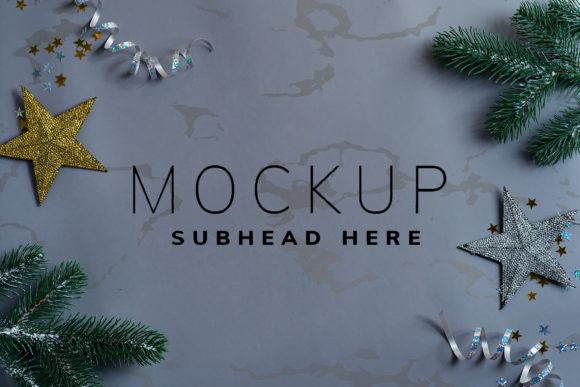
The versatility of this Christmas Background Mockup extends far beyond simple decoration. Its primary strength is the generous amount of negative space provided within the composition. In design theory, negative space is not merely empty room; it is a functional element that guides the viewer's eye and provides breathing room for typography. Because these backgrounds are not cluttered with distracting elements, they serve as perfect canvases for headlines, promotional copy, and calls to action.
For bloggers, this means creating header images that stand out in search results without obscuring the title text. For marketers, it translates to social media graphics where the message is clear even at small thumbnail sizes. The fact that the background color and texture do not change when the design is applied ensures a consistent aesthetic throughout a campaign. However, it is important to note that the background or design color does not change dynamically; the mockup preserves the original lighting and atmosphere of the scene. This is a deliberate choice that maintains realism, though it requires the user to plan their color palette accordingly.
The distinction between this tool and 3D rendering software is also worth noting. This is a photo-based asset, not a vector or a fully interactive 3D model. While 3D tools offer infinite rotation and customization, they often demand a steep learning curve and significant processing power. This mockup strikes a balance by offering photographic realism with the ease of use found in graphic design software. It is ideal for professionals who need speed and reliability rather than experimental manipulation.
Ideal Use Cases for Professionals and Creators
Who benefits most from utilizing a Christmas Background Mockup? The answer spans a wide range of creative roles. Small business owners can use these templates to create cohesive branding for their holiday sales without hiring a dedicated graphic designer. Freelancers can increase their turnaround time for clients, delivering professional-grade materials in a fraction of the usual time. Educators and publishers can produce engaging newsletters or magazine covers that feel current and festive.
Consider a scenario where a startup needs to launch a holiday newsletter. Using this mockup, the team can prepare a headline graphic, drop it into the smart object, and have a finished image ready for email distribution within minutes. Similarly, an influencer could batch-produce a week's worth of Instagram posts by swapping out different designs into the same background structure. This consistency builds a recognizable visual identity, which is a key metric for audience retention.
The archive also includes a greeting file and detailed instructions for working with the mockups. This documentation is vital for users who may be less familiar with Photoshop layers or smart objects. Clear guidance eliminates the frustration often associated with downloading new tools and ensures that the investment of time is immediately rewarded with usable results.
Potential Limitations and Strategic Considerations
While the Christmas Background Mockup offers substantial utility, it is not a universal solution for every design challenge. The most significant limitation is the static nature of the background. Since the lighting and textures are fixed, designers cannot alter the mood of the scene to match a specific brand tone that deviates significantly from the provided aesthetic. If a project requires a whimsical, cartoonish, or highly stylized environment that differs from the photographic style of the mockup, this tool would not be appropriate.
Additionally, because the design applied typography is NOT included, users must supply their own text assets. This is a standard practice for mockups but requires the user to have access to suitable fonts that complement the festive theme. Furthermore, while the files are high resolution, the final output is still dependent on the quality of the input design. Placing a low-resolution logo or blurry image into the smart object will result in a compromised final product, regardless of how high-quality the background is.
Another consideration is the file size. High-resolution images at 300 DPI can be large, which may impact loading times if not optimized properly for web use. Professionals should ensure they export their final images in formats like JPEG or WebP with appropriate compression settings to maintain performance on websites and blogs.
Conclusion: Assessing Value for Your Workflow
The decision to adopt a Christmas Background Mockup into your toolkit ultimately depends on your specific goals and workflow constraints. For professionals who prioritize efficiency, consistency, and high-quality presentation, this resource represents a strong return on investment. It removes the technical barriers of creating realistic environments and allows the focus to remain on the core message and creative content.
By providing full-resolution files, active smart objects, and safety zones, this bundle addresses the common pain points of seasonal design work. It empowers users to produce polished visuals for websites, social media, and print media with minimal effort. While it lacks the malleability of 3D software, its photographic authenticity and ease of use make it an indispensable asset for anyone looking to elevate their holiday content strategy. When used correctly, it transforms a standard design task into a seamless process, ensuring that your brand stands out during the busy holiday season.